Ans Graphics, Creative Design Studio, Logo & Branding
- 1st floor, 13/516, Kaveri Path, Mansarovar
- info(@)aginfotech.co.in
- (818) 700-1514


Graphic Designing: Turning Ideas into Powerful Visual Experiences
20/08/2026
Introduction
In today’s digital world, video editing has become one of the most important creative skills. From YouTube videos and Instagram Reels to advertisements, movies, business promotions, online courses, and product videos, high-quality editing helps transform simple footage into engaging visual content.
Video editing is not just about cutting unwanted parts from a video. It is the process of arranging clips, improving visuals, adding music, text, transitions, effects, and color to create a clear and powerful story.
What Is Video Editing?
Video editing is the process of organizing and modifying video footage to create a final video. An editor can combine multiple clips, remove unnecessary scenes, adjust timing, add background music, include graphics, and improve the overall visual quality.
Most modern video editing is done using a timeline, where video clips, audio, images, effects, and other elements are arranged in the order they will appear in the final video.
A good video editor focuses on more than technical tools. They also understand:
Storytelling
Timing and pacing
Music and sound
Color and lighting
Visual effects
Text and graphics
Audience engagement
Why Is Video Editing Important?
Raw footage is rarely ready to publish. It may contain mistakes, unnecessary pauses, poor lighting, background noise, or scenes that do not support the main message.
Professional video editing helps improve the final result by making the content more focused, polished, and engaging.
1. Creates a Strong Story
Editing allows creators to arrange scenes in the right order and remove unnecessary footage. This helps the audience understand the message clearly.
2. Improves Audience Engagement
Fast-paced cuts, attractive visuals, captions, music, and smooth transitions can help keep viewers interested.
3. Builds a Professional Brand Image
Businesses use videos for advertisements, product promotions, social media, websites, and brand campaigns. A professionally edited video can make a brand look more trustworthy and polished.
4. Makes Content Suitable for Different Platforms
The same video may need different versions for YouTube, Instagram, Facebook, LinkedIn, or other platforms. Editors can adjust the aspect ratio, duration, captions, and style according to the platform.
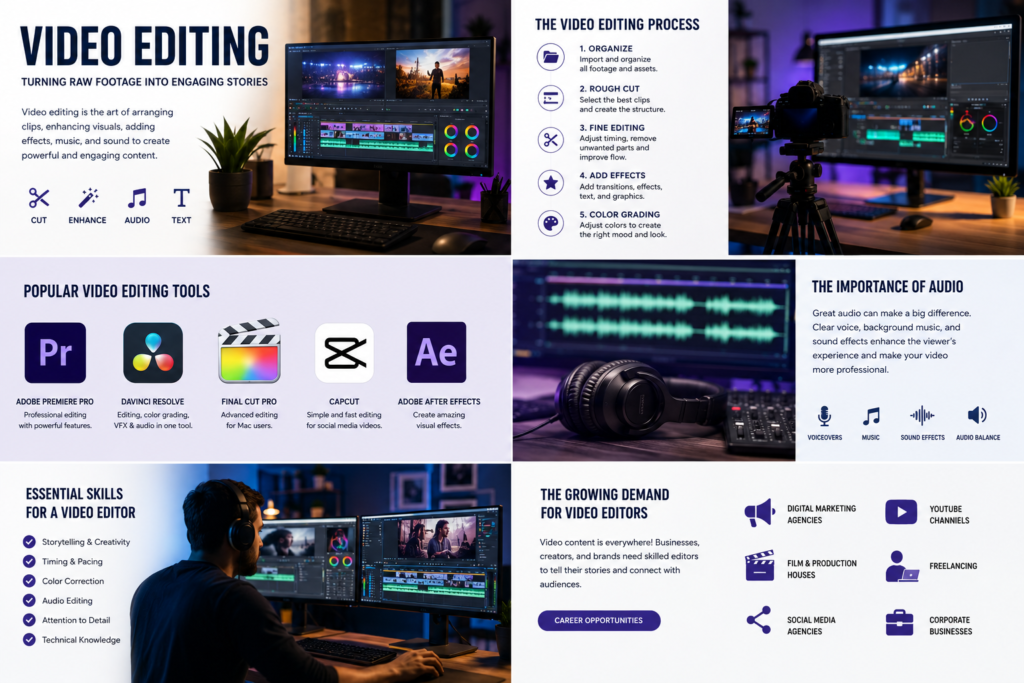
The Video Editing Process
Step 1: Organizing the Footage
The first step is importing and organizing all video clips, audio files, images, and other assets.
A professional workflow may include separate folders for:
Raw footage
Audio files
Music
Images
Graphics
Project files
Final exports
Good organization saves time and makes editing easier.
Step 2: Creating the Rough Cut
The rough cut is the first version of the video. The editor selects the best clips and places them on the timeline.
At this stage, the main goal is to build the structure of the story.
Step 3: Fine Editing
After creating the rough cut, the editor improves the timing of each scene. Unnecessary pauses and mistakes are removed, and clips are adjusted for a smoother flow.
This stage is where the video starts to feel more professional.
Step 4: Adding Transitions and Effects
Transitions help move smoothly from one scene to another. Effects can add visual interest, but they should be used carefully.
Too many transitions or effects can make a video distracting. The best edits usually support the story instead of overpowering it.
Step 5: Color Correction and Color Grading
Color correction improves the natural appearance of footage by adjusting brightness, contrast, exposure, and color balance.
Color grading goes further by creating a specific visual style or mood. For example, a video can have a cinematic, warm, dark, vibrant, or dramatic look.
The Importance of Audio in Video Editing
Great visuals alone are not enough. Audio is an important part of the viewing experience.
Video editors may work with:
Voiceovers
Dialogue
Background music
Sound effects
Ambient sound
Poor audio can make even a visually attractive video feel unprofessional. A good editor balances sound levels and removes unwanted noise when necessary.
Popular Types of Video Editing
Video editing is used across many industries and content formats.
Social Media Video Editing
Short-form content such as Instagram Reels, YouTube Shorts, and promotional videos often requires fast cuts, captions, motion graphics, and attention-grabbing visuals.
YouTube Video Editing
YouTube videos may include tutorials, vlogs, reviews, gaming videos, interviews, educational content, and entertainment.
Corporate Video Editing
Businesses use videos for company presentations, product demonstrations, advertisements, and promotional campaigns.
Wedding and Event Video Editing
Editors transform event footage into emotional and memorable videos using music, cinematic color grading, and storytelling.
Film and Cinematic Editing
Movies and short films require detailed editing, sound design, visual effects, and professional color grading.
Popular Video Editing Software
Different tools are suitable for different types of editors.
Adobe Premiere
Adobe Premiere provides professional editing tools, timeline-based workflows, color controls, audio tools, effects, and AI-powered features for modern video production.
DaVinci Resolve
DaVinci Resolve combines video editing, visual effects, color correction, color grading, and audio post-production in one professional workflow.
Final Cut Pro
Final Cut Pro is a popular option for Apple users who need professional editing tools and an efficient workflow.
CapCut
CapCut is widely used for social media content and short-form videos. It is especially popular among creators who want a simple editing experience.
The best software depends on your experience, budget, computer specifications, and the type of content you create.
Essential Skills for a Video Editor
Learning software is important, but strong editing also requires creative skills.
Storytelling
A good editor knows how to arrange scenes to create interest and emotion.
Timing
Knowing when to cut a scene can significantly improve the pace of a video.
Color Knowledge
Understanding contrast, color correction, and color grading helps create professional visuals.
Audio Editing
Clean dialogue, balanced music, and effective sound effects improve the overall quality.
Creativity
Creative ideas help videos stand out in a competitive digital environment.
The Growing Demand for Video Editors
Video content continues to play an important role in digital communication. Businesses, creators, influencers, agencies, and brands all need video content for marketing and audience engagement.
Video editors can work in areas such as:
Digital marketing agencies
Advertising companies
Production houses
Social media agencies
YouTube channels
E-commerce businesses
Freelancing
Corporate media teams
With the growth of short-form content, online video marketing, and digital platforms, video editing continues to be a valuable creative skill.
Tips for Creating Better Videos
Here are a few simple tips to improve your editing:
Keep the story clear and focused.
Remove unnecessary clips.
Use transitions only when they add value.
Choose music that matches the mood.
Add captions when appropriate.
Maintain consistent colors and visual style.
Pay attention to audio quality.
Export videos in the correct format and resolution for the target platform.
Conclusion
Video editing is the process that turns raw footage into meaningful and engaging content. It combines creativity, storytelling, technical knowledge, visuals, sound, and timing.
Whether you are creating a social media Reel, a YouTube video, a business advertisement, or a cinematic project, effective editing can significantly improve the final result.
A great video is not only about what you record—it is also about how you edit the story.